URL_base <- "https://edikte.justiz.gv.at/edikte/id/idedi8.nsf/suchedi?"
URL_example <- paste0(
  URL_base,
  "SearchView&subf=vid&SearchOrder=4&SearchMax=4999",
  "&retfields=~SDatArt1=DATAF~SDatWert3=01.12.2022",
  "~SDatWert4=16.12.2022~SDatWert1=~SDatWert2=",
  "&ftquery=&query=_%26__01.12.2022_DATAF_16.12.2022_"
)

page_example <- read_html(URL_example)

example_texts <- page_example |>
  html_elements(".rowlink") |>
  html_elements("a") |>
  html_text() |>
  as.data.frame() |>
rename("example_texts" = 1)Webscraping 
How to grab data from the internet ... (legally)
Introduction
Getting to know web technologies
Webscraping
- Extracting information from the web automatically
- Transform it into a structured dataset
- Similar to programming a bot (e.g. with Selenium)
- Everything you see is (somehow) accessible
- Requires some knowledge about HTML, CSS and JS
- And some help from your best friend is Ctrl+Shift+C
Web Technologies
- HTML and the DOM
- Hyper Text Markup Language defines the skeleton of webpages and gives elements attributes
- webpages are hierarchically structured in what is called the Document Object Model (DOM)
- webscraping: HTML elements usually contain the information we want to scrape
- CSS
- Cascaded Style Sheets style the appearance of HTML elements
- webscraping: CSS selectors help you to locate the HTML elements in the DOM
- JS
- JavaScript is used to manipulate and interact with content in the DOM
- webscraping: JS helps understand how data is loaded and processed
A Simple Web App
HTML
CSS
JavaScript
The resulting website:
Webscraping Libraries in R
- Rvest
- read out whole (static) webpage
- identify DOM elements via css selectors
- extract contents and attributes of HTML nodes
- RSelenium
- control browser from R
- program step by step instructions for browser actions
- access dynamic content not (immediately) rendered in DOM
- chromote
- controls a headless browser
- lighter alternative to Selenium (no Java/RSDriver)
Rvest
Reading out static pages
Edikte Data
- Interested in scraping the bankruptcy cases from edikte.gv
- “Data” is unstructured on thousands of different pages
- URL example
| example_texts |
|---|
| BG Schwechat, 19 S 39/22p |
| BG Bregenz, 19 S 27/22z |
| BG Telfs, 6 S 26/22v |
| BG Feldkirch, 16 S 16/22i |
| BG Favoriten, 66 S 47/22i |
| BG Villach, 18 S 125/22m |
| LGZ Graz, 25 S 123/22h |
| BG Meidling, 19 S 30/22z |
| BG Hall (in Tirol), 13 S 59/22i |
| HG Wien, 5 S 171/22i |
| BG Krems an der Donau, 4 S 52/22t |
| BG Spittal an der Drau, 6 S 27/22x |
| LG Wels, 20 S 76/22k |
| BG Mistelbach, 11 S 42/22h |
Extracting Attributes
| example_links |
|---|
| 0/bd0c562652404672c12588cb0073b0cb!OpenDocument |
| 0/913a533e7677528ac12588d20073a995!OpenDocument |
| 0/52a71f7f14a4f52dc12588d100740aaa!OpenDocument |
| 0/ffa869c17dbcb2fec12588de0073bd01!OpenDocument |
| 0/b5bb715f8f8ab86ec12588e80073a334!OpenDocument |
| 0/42f4e8b844359c6bc12588ef007931a9!OpenDocument |
| 0/0ee773dc3a02e704c12588e60074baa7!OpenDocument |
| 0/0da7258f728f754dc12588da0073b299!OpenDocument |
| 0/0a55a077a09aa1b6c12588ef007931b7!OpenDocument |
| 0/87ae11d538373b35c12588e60074b790!OpenDocument |
Data Overview
| example_texts | example_links |
|---|---|
| BG Schwechat, 19 S 39/22p | https://edikte.justiz.gv.at/edikte/id/idedi8.nsf/0/bd0c562652404672c12588cb0073b0cb!OpenDocument |
| BG Bregenz, 19 S 27/22z | https://edikte.justiz.gv.at/edikte/id/idedi8.nsf/0/913a533e7677528ac12588d20073a995!OpenDocument |
| BG Telfs, 6 S 26/22v | https://edikte.justiz.gv.at/edikte/id/idedi8.nsf/0/52a71f7f14a4f52dc12588d100740aaa!OpenDocument |
| BG Feldkirch, 16 S 16/22i | https://edikte.justiz.gv.at/edikte/id/idedi8.nsf/0/ffa869c17dbcb2fec12588de0073bd01!OpenDocument |
| BG Favoriten, 66 S 47/22i | https://edikte.justiz.gv.at/edikte/id/idedi8.nsf/0/b5bb715f8f8ab86ec12588e80073a334!OpenDocument |
| BG Villach, 18 S 125/22m | https://edikte.justiz.gv.at/edikte/id/idedi8.nsf/0/42f4e8b844359c6bc12588ef007931a9!OpenDocument |
Constructing An Extraction Strategy
date.end.month <- seq(
  as.Date("2007-02-01"),
  length = 6,
  by = "months"
  ) - 1
date.begin.month <- seq(
  as.Date("2007-01-01"),
  length = 6,
  by = "months"
  )
date.end.month <- format(date.end.month, "%d.%m.%Y")
date.proper <- format(date.begin.month, "%Y-%m-%d")
date.begin.month <- format(date.begin.month, "%d.%m.%Y")

dates <- as.data.frame(cbind(
  date.begin.month,
  date.end.month,
  date.proper
))| date.begin.month | date.end.month | date.proper |
|---|---|---|
| 01.01.2007 | 31.01.2007 | 2007-01-01 |
| 01.02.2007 | 28.02.2007 | 2007-02-01 |
| 01.03.2007 | 31.03.2007 | 2007-03-01 |
| 01.04.2007 | 30.04.2007 | 2007-04-01 |
| 01.05.2007 | 31.05.2007 | 2007-05-01 |
| 01.06.2007 | 30.06.2007 | 2007-06-01 |
Looping Through Link Table
data_cases <- data.frame(
  case_nr = character(),
  case_link = character(),
  case_address = character(),
  month = character()
  )

for(i in 1:nrow(dates)) {

  temp <- NULL

  URL_ext <- paste0(
    "SearchView&subf=vid&SearchOrder=4&SearchMax=4999&retfields=~SDatArt1=~SDatWert3=~SDatWert4=~SDatWert1=",
    dates[i,1],
    "~SDatWert2=",
    dates[i,2],
    "~BMAZ=2&ftquery=&query=_%26__",
    dates[i,1],
    "_DATBM_",
    dates[i,2],
    "_"
    )

  URL <- paste0(URL_base, URL_ext)
  pg <- read_html(URL)

  case_nr <- pg |>
    html_elements(".rowlink") |>
    html_elements("a") |>
    html_text() |>
    as.data.frame() |>
    rename("case_nr" = 1)

  case_link <- pg |>
    html_elements(".rowlink") |>
    html_elements("a") |>
    html_attr("href") |>
    as.data.frame() |>
    rename("case_link" = 1)

  case_address <- pg |>
    html_element("table") |>
    html_table() |>
    rename(case_debtor = 3) |>
    mutate(case_address = str_extract(case_debtor, "\\d{4}")) |>
    select(case_address)

  temp <- cbind(case_nr, case_link, case_address) |>
    mutate(case_link = paste0("https://edikte.justiz.gv.at/edikte/id/idedi8.nsf/", case_link)) |>
    mutate(month = dates[i,3])

  data_cases <- data_cases |> add_row(temp)

  if (i %% 1 == 0) {
    print(paste0("Total: ", nrow(dates), ", Current: ", i))
  }

}| case_nr | case_link | case_address | month |
|---|---|---|---|
| BG Telfs, 6 S 12/06m | https://edikte.justiz.gv.at/edikte/id/idedi8.nsf/0/5511ee0578636699c1257a6c006f0fd8!OpenDocument | 6410 | 2007-01-01 |
| LG Wiener Neustadt, 11 S 33/04w | https://edikte.justiz.gv.at/edikte/id/idedi8.nsf/0/3420fc6dc4dde959c1257a6c00635f6f!OpenDocument | 2640 | 2007-01-01 |
| BG Bregenz, 19 S 1/07d | https://edikte.justiz.gv.at/edikte/id/idedi8.nsf/0/b5fcc3e511121da9c1257a6c007055fb!OpenDocument | 6921 | 2007-01-01 |
| BG Favoriten, 41 S 20/06m | https://edikte.justiz.gv.at/edikte/id/idedi8.nsf/0/2b41a64fdbc1d437c1257a6c0057f68b!OpenDocument | 1100 | 2007-01-01 |
| BG Linz, 26 S 101/06k | https://edikte.justiz.gv.at/edikte/id/idedi8.nsf/0/32ee2fcd7318d6e4c1257a6c006531d1!OpenDocument | 4020 | 2007-01-01 |
| BG Josefstadt, 11 Se 10/06w | https://edikte.justiz.gv.at/edikte/id/idedi8.nsf/0/139b5e83e35ed751c1257a6c005c4c39!OpenDocument | 1090 | 2007-01-01 |
Extract Info from Case Pages
example_info <- read_html(example_data$example_links[2]) %>%
  html_elements("dl , div.zeilehead") %>%
  html_text() %>%
  as.data.frame() %>%
  mutate(Sub = sapply(str_split(., ":"), "[[", 1)) %>%
  mutate(Info = gsub("^.*?:", "", .)) %>%
  select(-.)

example_type <- read_html(example_data$example_links[2]) |>
  html_elements("#Verfahren") |>
html_text()| Sub | Info |
|---|---|
| Bekannt gemacht am 5. Oktober 2022 | Bekannt gemacht am 5. Oktober 2022 |
| Schuldner | AktanVorname:MericLindauerstraße 95/126912 HörbranzGebdat: 06.08.1982 |
| Beteiligter | Sylvester Inkert p.A. Verein Neuanfang Vertreter des Schuldners Rheinstr. 32 6900 Bregenz Tel.: 0699/88448467, Fax: 05574/61544 |
| Eröffnung | Beginn der Wirkungen der Eröffnung: 06.10.2022 Anmeldungsfrist: 05.12.2022 |
| Geringfügig | Das Schuldenregulierungsverfahren ist geringfügig. |
| Eigenverwaltung | Eigenverwaltung des Schuldners. |
Looping Through Case Pages
data_info <- data.frame(
  info = character(),
  text = character(),
  type = character(),
  case_nr = character(),
  case_link = character(),
  case_address = character(),
  month = character()
  )

for(i in 1:nrow(data_cases)) {

  temp <- NULL

  temp <- read_html(data_cases$case_link[i]) %>%
    html_elements("dl , div.zeilehead") %>%
    html_text() %>%
    as.data.frame() %>%
    mutate(info = sapply(str_split(., ":"), "[[", 1)) %>%
    mutate(text = gsub("^.*?:", "", .)) %>%
    select(-.)

  type <- read_html(data_cases$case_link[i]) |>
    html_elements("#Verfahren") |>
    html_text()

  temp$type <- type[length(type)]
  temp$case_nr <- data_cases$case_nr[i]
  temp$case_link <- data_cases$case_link[i]
  temp$case_address <- data_cases$case_address[i]
  temp$month <- data_cases$month[i]

  data_info <- data_info |> add_row(temp)

  if (i %% 100 == 0) {
    print(paste0("Total: ", nrow(data_cases), ", Current: ", i))
  }

}| info | text | type | case_nr | case_link | case_address | month |
|---|---|---|---|---|---|---|
| Bekannt gemacht am 1. Juni 2006 | Bekannt gemacht am 1. Juni 2006 | Schuldenregulierungsverfahren | BG Telfs, 6 S 12/06m | https://edikte.justiz.gv.at/edikte/id/idedi8.nsf/0/5511ee0578636699c1257a6c006f0fd8!OpenDocument | 6410 | 2007-01-01 |
| Schuldner | AbfaltererVorname:ChristophArbeiterWiesenweg 56410 TelfsGebdat: 24.06.1972 | Schuldenregulierungsverfahren | BG Telfs, 6 S 12/06m | https://edikte.justiz.gv.at/edikte/id/idedi8.nsf/0/5511ee0578636699c1257a6c006f0fd8!OpenDocument | 6410 | 2007-01-01 |
| Eröffnung | Eröffnung des Schuldenregulierungsverfahrens: 01.06.2006 Anmeldungsfrist: 01.08.2006 | Schuldenregulierungsverfahren | BG Telfs, 6 S 12/06m | https://edikte.justiz.gv.at/edikte/id/idedi8.nsf/0/5511ee0578636699c1257a6c006f0fd8!OpenDocument | 6410 | 2007-01-01 |
| Geringfügig | Das Schuldenregulierungsverfahren ist geringfügig. | Schuldenregulierungsverfahren | BG Telfs, 6 S 12/06m | https://edikte.justiz.gv.at/edikte/id/idedi8.nsf/0/5511ee0578636699c1257a6c006f0fd8!OpenDocument | 6410 | 2007-01-01 |
| Eigenverwaltung | Eigenverwaltung des Schuldners. | Schuldenregulierungsverfahren | BG Telfs, 6 S 12/06m | https://edikte.justiz.gv.at/edikte/id/idedi8.nsf/0/5511ee0578636699c1257a6c006f0fd8!OpenDocument | 6410 | 2007-01-01 |
RSelenium
Taking control of your browser via R
Opening a Selenium Client
- Versioning often critical
- Running from Docker container is recommended

Revisiting Edikte Data
- Automate actions in browser with Selenium
client$navigate(URL_base)

element <- client$findElement(using = "link text", "Erweiterte Suche")
element$getElementAttribute("href")
element$clickElement()

search_field <- client$findElement(using = "name", "SchuldnerS")
search_field$sendKeysToElement(list("Lukas Schmoigl", key = "enter"))

client$executeScript("window.scrollTo(0,document.body.scrollHeight);")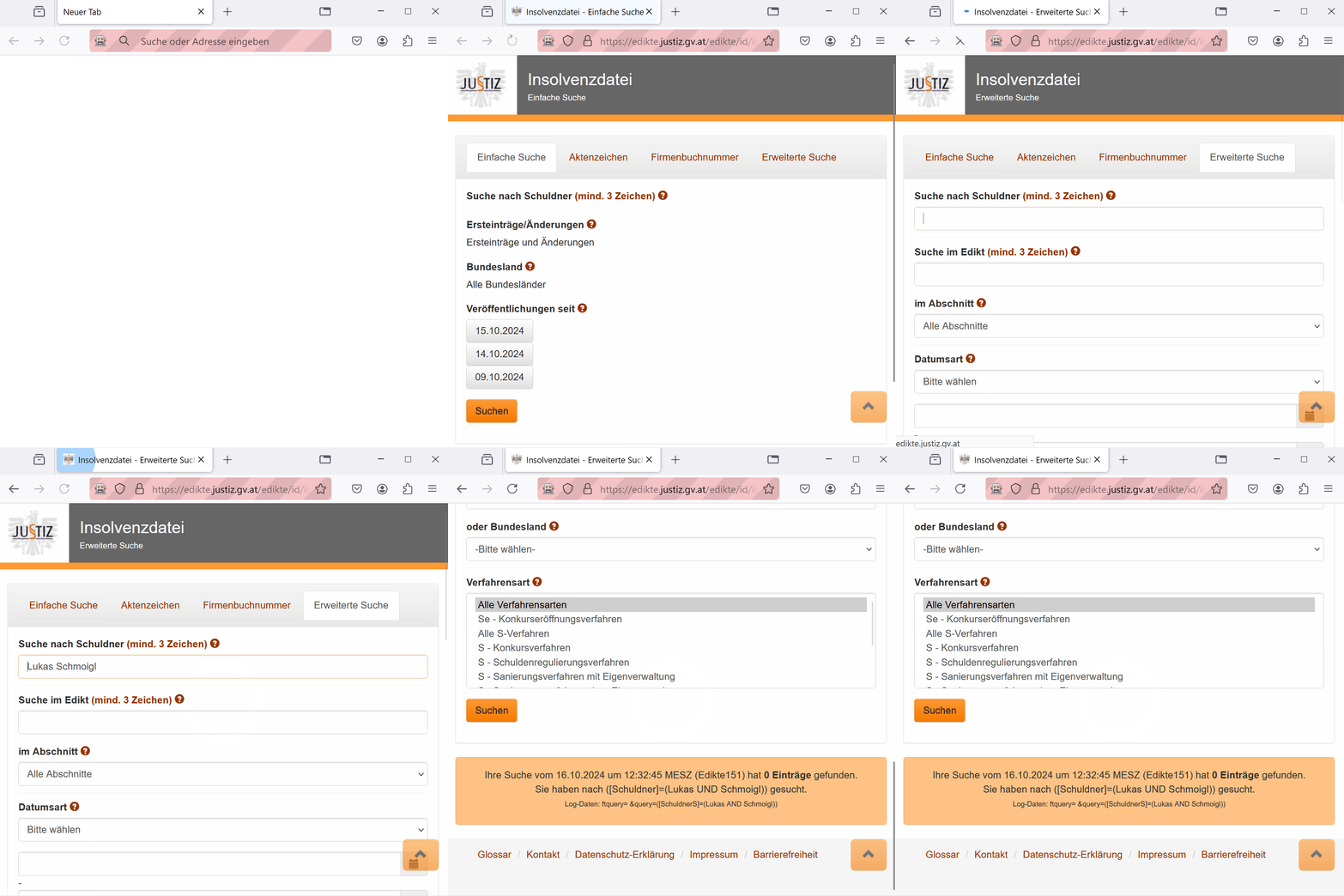
STATatlas
- Scraping of STATatlas more difficult
- Data is rendered on canvas rather than directly in DOM
- However data point rendered into tooltip on hover
Extraction Strategy
Sys.sleep(2)
client$navigate("https://www.statistik.at/atlas/")

element <- client$findElement(
  using = "css selector",
  ".them_icon_wrap:nth-child(5) img"
  )
element$clickElement()

element <- client$findElement(
  using = "css selector",
  ".map_link:nth-child(4) p"
  )
element$clickElement()

search_field <- client$findElement(
  using = "id",
  "filterBB"
  )
search_field$sendKeysToElement(list(
  "4820",
  key = "enter")
  )

search_prompt <- client$findElement(
  using = "link text",
  "4820"
  )
search_prompt$clickElement()

element <- client$findElement(
  using = "css selector",
  ".ol-unselectable"
  )
element$clickElement()

hover_info <- client$findElement(
  using = "id",
  "div_feature_info_title"
  )
hover_info$getElementText()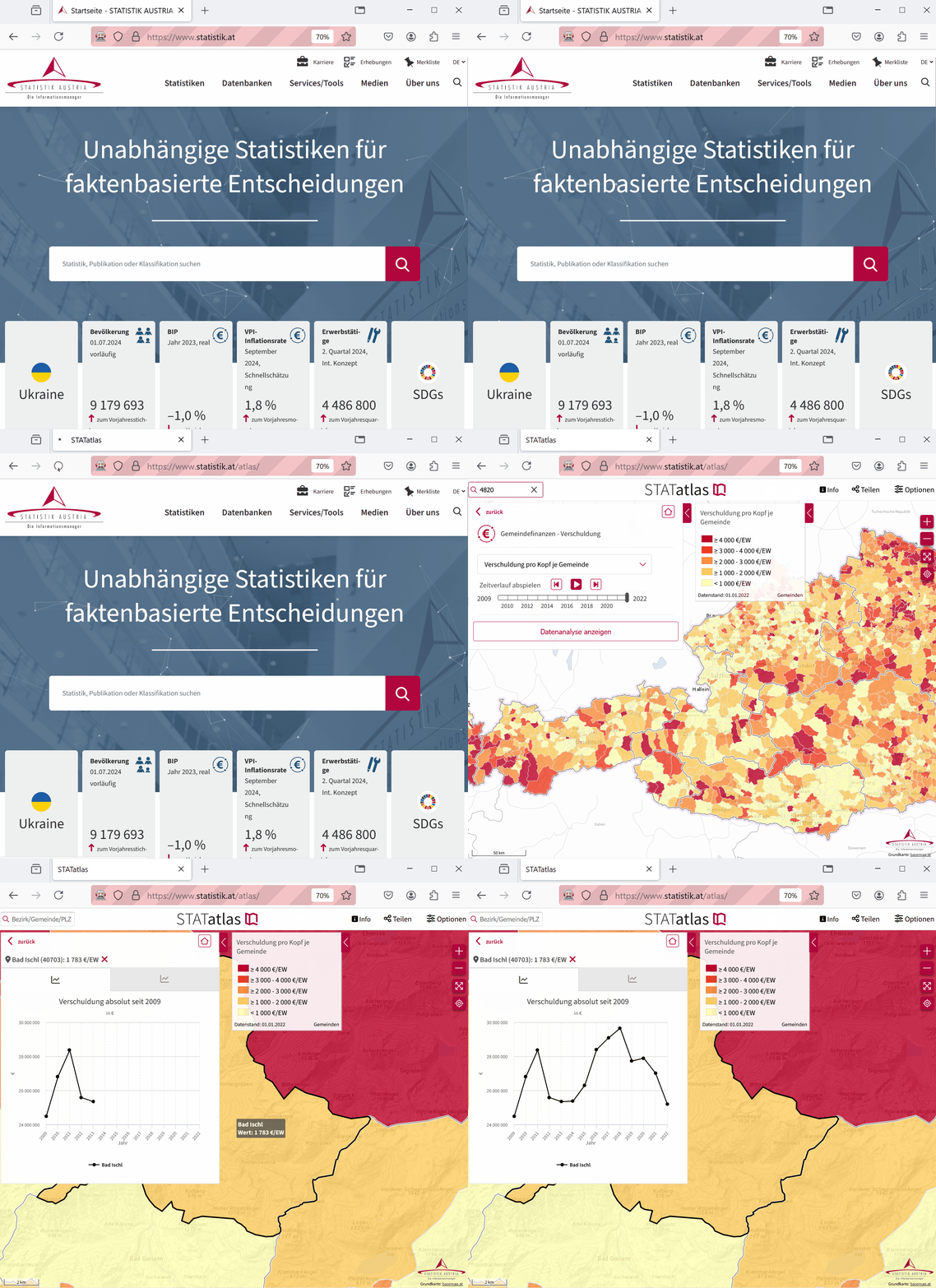
Looping
for(i in 1:length(postcodes)) {

  client$navigate("https://www.statistik.at/atlas/")

  element <- client$findElement(
    using = "css selector",
    ".them_icon_wrap:nth-child(5) img"
    )

  element$clickElement()

  element <- client$findElement(
    using = "css selector",
    ".map_link:nth-child(4) p"
    )

  element$clickElement()

  search_field <- client$findElement(
    using = "id",
    "filterBB"
    )

  search_field$sendKeysToElement(
    list(
      postcodes[i],
      key = "enter"
      )
    )

  Sys.sleep(1) # zoom takes some time

  search_prompt <- client$findElement(
    using = "link text",
    postcodes[i]
    )

  search_prompt$clickElement()

  element <- client$findElement(
    using = "css selector",
    ".ol-viewport > .ol-unselectable"
    )

  element$clickElement()

  hover_info <- client$findElement(
    using = "id",
    "div_feature_info_title"
    )

  Sys.sleep(1)
  datum <- hover_info$getElementText()[[1]]
  print(datum)
  data_debt <- rbind(data_debt, datum)

}| Gemeinde |
|---|
| Bad Ischl (40703): 1 783 €/EW |
| Hallwang (50316): 0 €/EW |
| Schwarzenau (32524): 1 920 €/EW |
| Türnitz (31414): 1 697 €/EW |
| Mittelberg (80228): 3 182 €/EW |
| Lienz (70716): 895 €/EW |
| Gmunden (40705): 2 272 €/EW |
| Salzburg (50101): 168 €/EW |
| Neulengbach (31926): 3 097 €/EW |
| Güssing (10405): 3 212 €/EW |
Challenges and Considerations
Trying not to get into trouble
Technical Hurdles
- Rate limiting or IP blocking
- add (random) delays between requests (
Sys.sleep()) - rotate IP addresses or use proxies
- add (random) delays between requests (
- Dynamic content
- check API calls or data load before scraping
- use browser automation instead of Rvest for JS-rendered pages
- authenticate via session cookies or API tokens
- CAPTCHAs and automatd tests
- imitate user behavior (e.g. cursor speed)
- use realistic browser data (e.g. user-agent headers, cookies)
- human-in-the-loop or image recognition for solving tests
Legal and Ethical Considerations
- No specific laws prohibiting scraping of (openly available) info from web
- Terms of use of internet platforms and services etc. may be violated
- Data protection laws may be an issue
- Intellectual property rights may be an issue
- Considerations in advance
- Check robots.txt
- Use polite
- Ask the owner for API access
- Scraping may impede access to important services
Running Into Problems
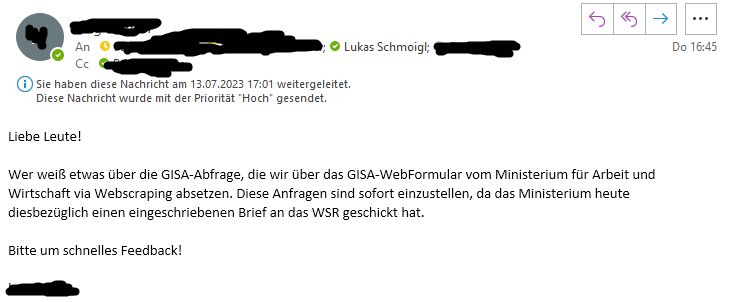
- You might get some unpleasant mail
Assignment I
- Webscraping - your turn
- Find data on the internet you are interested in
- Check if you are allowed to scrape it (robots.txt)
- Scrape the website
- Prepare the data so that it is ready for data analysis (descriptives and or viz)
OR
- Workflow Automation - your turn
- Think about data related tasks you regularly do / want to do
- Automate the task
- Include some form of check if the task succeeded
Due date: October 30th
